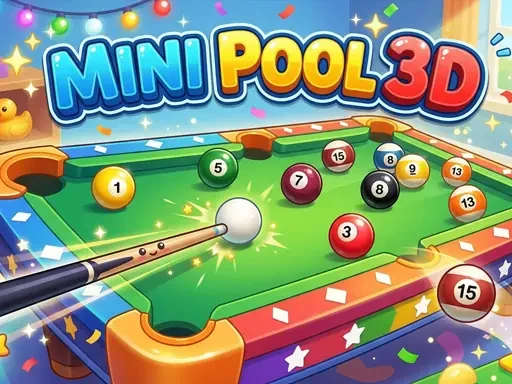

Mini Pool 3D Description
Mini Pool 3D Instructions
Q: How do I control the gameplay in Mini Pool 3D?
A: Mini Pool 3D uses simple pointer controls. On desktop, aim with your mouse, click and hold to pull back the cue, adjust power using the on-screen meter, and release to shoot. On touchscreen devices, tap, hold, and drag to aim and set power, then release your finger to shoot.
Q: What are the main game modes in Mini Pool 3D?
A: Mini Pool 3D features three modes: 'Classic' for free play without rules or time limits, 'Arcade' with 20 progressive challenge levels, and 'Time Attack' where you race to clear the table against the clock.
Q: What is the main goal in Mini Pool 3D?
A: The core objective in all modes of Mini Pool 3D is to use the cue ball to pocket all the numbered object balls on the table according to the rules of the active mode.
Related Games

Paper Princess Doll Dress Up
Dino Hunter 3D
Ocean Kids Back To School

Fall Aesthetics
Fly and shoot 1. Italian Bosses

Pool Billiards 3D

Santa Claus Rush
Fruit Slice - Fruit Ninja Classic

Billiard Diamond Challenge
Billiard Champion

Neon Billard Pool
Falling Blocks - Tetris Game

Bubble Shooter Wild West
Halloween Tic Tac Toe
Soda Block Jam

Bloon Pop

Color blast
Rope Master

Vector Parkour

Billiards 888
Car Parking 2
stick cricket
Sort Balls 3D