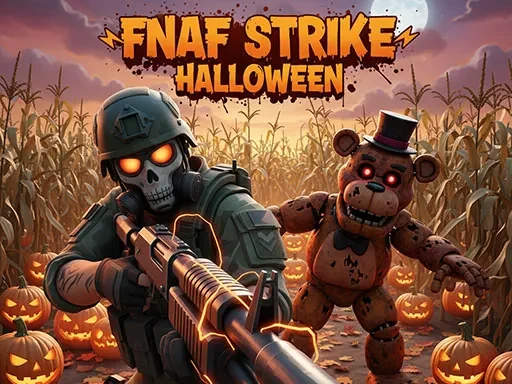
FNAF Strike Halloween
Loading...

FNAF Strike Halloween Description
FNAF Strike Halloween transforms the familiar terror of the Five Nights at Freddy's universe into a relentless, action-packed first-person shooter. This unique entry, FNAF Strike Halloween, drops you directly into its nightmarish, holiday-twisted corridors where survival demands more than just hiding. Your objective is clear: fight your way through onslaughts of reanimated, Halloween-themed animatronics, locate the exit in each level, and escape before they overwhelm you. The atmosphere in FNAF Strike Halloween is meticulously crafted, featuring decrepit party decorations, long-abandoned haunted hallways, and the constant, unsettling ambiance of flickering lights and distant, eerie sounds that amplify the classic FNAF horror.
As you delve deeper into FNAF Strike Halloween, the challenge intensifies. Each new area introduces more complex enemy behaviors, hidden environmental traps designed to catch you off guard, and increasingly resilient foes that will push your combat reflexes and aiming precision to their absolute limit. This isn't a passive experience; FNAF Strike Halloween requires constant vigilance, quick decision-making, and resource management as you scavenge for ammo and navigate the treacherous layouts. The fusion of classic FNAF aesthetic with fast-paced shooter mechanics creates a distinct and adrenaline-fueled horror experience that defines FNAF Strike Halloween. Every corner turned and every door opened could lead to a sudden, violent encounter, making progress a tense and rewarding struggle against the iconic animatronics now unleashed in their most aggressive and Halloween-inspired forms.
FNAF Strike Halloween Instructions
Q: How do I control my character in FNAF Strike Halloween?
A: Use WASD keys for movement, Spacebar to jump, C to crouch, and hold Shift to sprint.
Q: What are the primary combat controls in FNAF Strike Halloween?
A: Left Mouse Button (LMB) fires your weapon, Right Mouse Button (RMB) aims down sights or toggles your flashlight, R reloads, G throws a grenade, and H performs a melee attack.
Q: How do I interact with doors and objects in FNAF Strike Halloween?
A: Press the F key near interactive elements like doors or items.
Q: How do I manage weapons and the game menu in FNAF Strike Halloween?
A: Use number keys 1 through 9 to switch weapons quickly, press Tab to pause the game and access the menu, and use M to mute the audio.
FNAF Strike Halloween Details
Resolution:960x600
Supported Platforms:PC, Mobile
Related Games

Super Mario vs Wario
Dino Hunter 3D
Sky Driver 2021

Fly and shoot 1. Italian Bosses
Anti Terrorist Shooting Game
Paintball Gun Pixel 3D
Cover Strike - 3D Team Shooter
CobraZ io
Halloween Tic Tac Toe
Kick The Zombie
Spot The Differences Halloween

Glow Nails Halloween
Nina The Killer: Go To Sleep My Prince

Baby in Yellow Game
Cemetery Halloween
The Island of Momo

Zombie Shooter 3D
Last Z Survival Shooter
Plane
Apocalypse Truck
PGA3 Zombie

Zumba Ocean
Bricks Balls Breaker